4.Cisco ASA Site-to-Site IPsec VPN Digital Certificates
When you use pre-shared keys, you have to manually configure a pre-shared key for each peer that you want to use IPsec with.
With digital certificates, each peer gets a certificate from a CA (Certificate Authority). When two peers want to use IPsec, they exchange their certificates to authenticate each other.
What’s the big difference? One advantage of digital certificates is scalability.
For example, let’s say you have one firewall at your main office and 10 branch offices with a firewall each. All branch offices use IPsec to encrypt traffic between the branch and main office. For security reasons, we use a different pre-shared key between the main office and each branch office.
When you want to add an additional ASA firewall at your main office (perhaps for redundancy) then you will have to configure 10 additional pre-shared keys, one for each branch office. When two branch offices want to use IPsec between each other, you’ll need another pre-shared key.
With digital certificates, all firewalls will trust the certificates that are signed by the CA. When you want to use IPsec with a new firewall, the only thing you need to do is add a certificate to the new firewall. The other firewalls will automatically trust it since it was signed by the CA.
In this lesson, I’ll explain how to configure your Cisco ASA firewalls to use digital certificates for IPsec. We will use an OpenSSL server as the CA that signs the certificates for our firewalls.
Before you configure with this lesson, I would recommend finishing the following two lessons first:
In the first lesson you will learn how to build a CA with OpenSSL, the second lesson explains how to configure IPsec site-to-site VPNs with pre-shared keys.
Having said that, let’s get to work!
1Configuration
We will use the following topology:
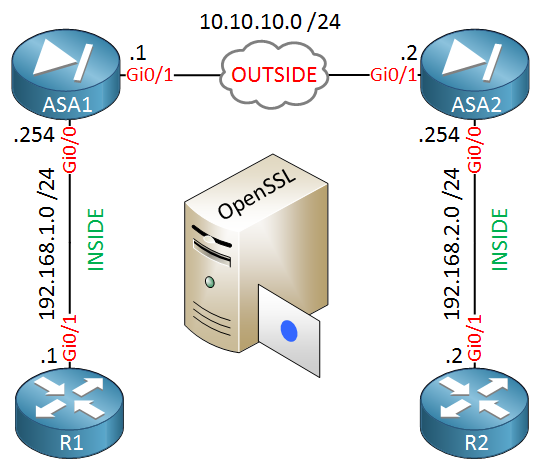
ASA1 and ASA2 are our two firewalls that we will configure to use IPsec to encrypt traffic between 192.168.1.0/24 and 192.168.2.0/24. Our routers, R1 and R2 are only used to test the VPN.
In the middle you will find the OpenSSL server. We don’t need network connectivity for this server to sign our certificates.
One thing you should check first is if your time, date and timezone is correct on all devices:
ASA1# show clock
10:04:12.169 CEST Fri Apr 8 2016
ASA2# show clock
10:04:08.329 CEST Fri Apr 8 2016It’s a good idea to configure NTP on your Cisco ASA firewalls.
1.1.Install Root Certificate
Our firewalls have to trust our CA and we can do this by importing its root certificate. Let’s configure a trustpoint:
ASA1(config)# crypto ca trustpoint MY_CA
ASA1(config-ca-trustpoint)# enrollment terminal
The trustpoint is called MY_CA and we will enroll the certificate from the terminal. We can do this with the following command:
ASA1(config)# crypto ca authenticate MY_CA
Enter the base 64 encoded CA certificate.
End with the word "quit" on a line by itself
-----BEGIN CERTIFICATE-----
MIIGBzCCA++gAwIBAgIBADANBgkqhkiG9w0BAQsFADCBnTELMAkGA1UEBhMCTkwx
FjAUBgNVBAgMDU5vcnRoLUJyYWJhbnQxEDAOBgNVBAcMB1RpbGJ1cmcxFzAVBgNV
BAoMDk5ldHdvcmtsZXNzb25zMSAwHgYDVQQDDBdDQS5uZXR3b3JrbGVzc29ucy5s
b2NhbDEpMCcGCSqGSIb3DQEJARYaYWRtaW5AbmV0d29ya2xlc3NvbnMubG9jYWww
HhcNMTYwNDAxMDg1ODMxWhcNMjYwMzMwMDg1ODMxWjCBnTELMAkGA1UEBhMCTkwx
FjAUBgNVBAgMDU5vcnRoLUJyYWJhbnQxEDAOBgNVBAcMB1RpbGJ1cmcxFzAVBgNV
BAoMDk5ldHdvcmtsZXNzb25zMSAwHgYDVQQDDBdDQS5uZXR3b3JrbGVzc29ucy5s
b2NhbDEpMCcGCSqGSIb3DQEJARYaYWRtaW5AbmV0d29ya2xlc3NvbnMubG9jYWww
ggIiMA0GCSqGSIb3DQEBAQUAA4ICDwAwggIKAoICAQCZUTCvJS+/ykH/+UtXI0yv
R9hqBZCKbB9KdhcuvvsM2QcLrsSS1u5hDW9K6K9rmK8Jj/M0E2pezEFZPdIVQIqV
JUKoBp0O6XwhNtWJLzAtP43xEqtmKMoAyr7lPOP1yaqgo+jdVY+xwZSD1diI/tFP
vUEL29/GoKTWsuz9k4sP82e766t47bn9butNLclpljLWilbZLJgN3hQk3NSo03GO
f/wO85aYo3VmACaPkkkGZhk1RhwE7kifV3HufmRGCtHHuTPmbORxvzNbq7k0Bfot
wXGMLVS2R08bqV4o91Z+1UfKXeBV5S7fHHCBFmJ8cQConkR5eSmq8nUXzs1Sb7tX
t53OP43APmPulkiOYuyZgkyqy6NOozbu4IWTCH1508+NHCSiKFwCnS+jt8RxxBFB
m9IGCy6MbL4Pjd1TsZECcYdERW2nZRf/hXlVg+SP8AUPKhpJcfN1fPTi0jF2K9DX
LeUgWbnIpy2vyyU/cYzJeCtCLoJECKOI/nQRYYJjh4AhK3+hXfqrm7HiU2lprpyN
8NL35E7bRUGF5voUeAtPS+xTcGr9giNPrayGj4inbbBWcD+GVDZOhZ1a7GZjyw1A
0OrLRviwVscoEKiLXic7GI5ChnIeZtHzflLWAt/gu2tYNnrnQv/zyICN+VPJD1Z/
aCdRwJTeDuBoviLy2ZKbmQIDAQABo1AwTjAdBgNVHQ4EFgQUGzi2n4JGcloEB3bC
2qVd65WDgTAwHwYDVR0jBBgwFoAUGzi2n4JGcloEB3bC2qVd65WDgTAwDAYDVR0T
BAUwAwEB/zANBgkqhkiG9w0BAQsFAAOCAgEARHaBLlb09q0/UPpM8TKgdkfwalb/
35zM2zjpvCR3q1dIMwZ4kYZHLmNBph3HE0rHzub44YLoiMOXQxklekcVTQo95ZFe
hGCaah9GUCNc6ck3WaQA9IcsWT6YLnWbUs4YKoV1Blp1O2nLAzm3YJNYiRnfvG0R
yTNLgA9cHdCHLtHv7vSrMHRYrZC+O2OE+nUO8NVcYpnAClx5ESzorKSpo5eLExgL
v0iY82YgsG67CaGKkHl1jzQDBnzBueSxqedqiZDoENsOc2uxl/h5Rkn14B7xc6I6
x+joKVmPWudbtjm1bG9ntXgnC6KifH8dALgHoAPqTOVUBdx8I1nDn6SrSPQIZTUL
zkxr7/VvfbTkfpiFEQMve718JOJ81MAksJ665Kv5A5wbmqbGCmPiE3aHcR/ErPFH
qpvYVXoiJJFKCSsFl3h7HpGrrzrghW2AjlqssOFRnT9mGKNbiqKOZ4Ow6CsR2qQU
I/SxxDPiPqOM3H3Knq5yV6O5jLTh1jhV1CGwxkZhlIssTGCqfF7r1aFqiGq53SfM
KtURG/XP9awc/VzJqHdV0tQmNJ0YKkTc90wgJepppw9Ud6v2/80TO5rgmGCvROXa
mYuubFQuc+hwBL6pKe3Rag6fB/5SeKS5CNV3zBXUj2t84kNs0AZGgQNd5sidr7xg
qqakkepONr6GoFU=
-----END CERTIFICATE-----
quit
Above I have pasted the contents of the cacert.pem file of my OpenSSL server. Don’t forget to add quit at the bottom. Once you have done this, you will see the following message:
ASA1#
INFO: Certificate has the following attributes:
Fingerprint:     4f35ae5b 496c0183 ddb8cadd 0d77e6f8
Do you accept this certificate? [yes/no]: yes

Trustpoint CA certificate accepted.

% Certificate successfully imported
ASA1 now trusts certificates that are signed by our CA.
1.2.Generate CSR (Certificate Signing Request) on ASA
The next step is to create a certificate for ASA1. We will do this by creating a CSR (Certificate Signing Request) which the CA will sign.
Let’s configure a hostname and domainname for our ASA:
ASA1(config)# hostname ASA1
ASA1(config)# domain-name networklessons.local
The CSR has to be signed with a private key so let’s generate one:
ASA1(config)# crypto key generate rsa label ASA1_KEY modulus 2048
INFO: The name for the keys will be: ASA1_KEY
Keypair generation process begin. Please wait...
This will generate a key-pair called ASA1_KEY. Now we will configure the attributes for our CSR in the trustpoint:
ASA1(config)# crypto ca trustpoint MY_CALet’s configure the FQDN (Fully Qualified Domain Name) for our ASA:
ASA1(config-ca-trustpoint)# fqdn ASA1.networklessons.localAnd the attributes that identify our device:
ASA1(config-ca-trustpoint)# subject-name O=Networklessons, C=NL, EA=admin@networklessons.local, ST=North-Brabant, CN=ASA1.networklessons.localWe also need to specify the key that we want to use so sign the CSR. We will use the key-pair that we just created:
ASA1(config-ca-trustpoint)# keypair ASA1_KEYWe are now ready to create the CSR:
ASA1(config)# crypto ca enroll MY_CA
% Start certificate enrollment ..
% The subject name in the certificate will be: O=Networklessons, C=NL, EA=admin@networklessons.local, ST=North-Brabant, CN=ASA1.networklessons.local

% The fully-qualified domain name in the certificate will be: ASA1.networklessons.local

% Include the device serial number in the subject name? [yes/no]: no

Display Certificate Request to terminal? [yes/no]: yes
Certificate Request follows:
-----BEGIN CERTIFICATE REQUEST-----
MIIDRDCCAiwCAQAwgbcxIjAgBgNVBAMTGUFTQTEubmV0d29ya2xlc3NvbnMubG9j
YWwxFjAUBgNVBAgTDU5vcnRoLUJyYWJhbnQxKTAnBgkqhkiG9w0BCQEWGmFkbWlu
QG5ldHdvcmtsZXNzb25zLmxvY2FsMQswCQYDVQQGEwJOTDEXMBUGA1UEChMOTmV0
d29ya2xlc3NvbnMxKDAmBgkqhkiG9w0BCQIWGUFTQTEubmV0d29ya2xlc3NvbnMu
bG9jYWwwggEiMA0GCSqGSIb3DQEBAQUAA4IBDwAwggEKAoIBAQDRXTZCwUQxpwF0
3P/qDGziiEF3gAXn+Tok+k5YLr/qyYBI3p2U7Yw7nyfVgtMqGjC42aIcWgRF+68d
XhP0Gj3FydRSYwL+3O1yP8ZbEo7Djfe6rLQg5M6IJqXUhy4Gk1zLCCF50Oul+kQ8
5JMJlE4sg4Fe6EEjykl1F0dwpx97mfuWqz27vY55o8NiFAbfqt9Ss2wizu1kwo/h
2mZNpPzQlbdNBpkOuJRDxcDs5eM9fZtzeLROM2t1keFLkbI6ZCrKQE26KjqEBY4Q
QUPDUYJQrdR77VQ6+LWl3OoYhrjhcGC8d9tw8We6JjjUljs4cA6smJuQA6jgorAF
Rr45unUNAgMBAAGgRzBFBgkqhkiG9w0BCQ4xODA2MA4GA1UdDwEB/wQEAwIFoDAk
BgNVHREEHTAbghlBU0ExLm5ldHdvcmtsZXNzb25zLmxvY2FsMA0GCSqGSIb3DQEB
BQUAA4IBAQCkIDeGBahWA3BiqSIckkkB+xJvPsRNSGMtlW8GX6FH3BELAltvvLnZ
D8f0ZzE1q58uiDzcht413C7xJ/8SmoYZi61g9G5snG+H5omWUWrjEffIDzjT6fo+
F5YeY4IU9nmeluLP89JjgIslJRLJfBuslnHVEl6I9t6Zkdtrs1TYDtmxJKGMZaD0
mloPcIG89py7/1UfbX96r01vfJNDLehsAY8GgxN+9btnlSaJ2uwH/Ytu+Lq7QO47
uc2j8+VmfRJqUkl0fEd7a7CR0owMGZ4kjK3mbP1kUHDdsFo/zpO7nAaKbRsOzaUs
W7sKv/Ty9XE1zxujHmMVXh1r/yuepOlB
-----END CERTIFICATE REQUEST-----

Redisplay enrollment request? [yes/no]: no
Above you can see that the firewall asks us to include the serial numbers, this is not required. Answer yes to display the CSR in the terminal.
We require this CSR on our CA so copy the contents (including the BEGIN and END lines) into a new file on your CA. I will call my file ASA1_CSR.txt.
We can use OpenSSL to sign the CSR:
# openssl ca -in ASA1_CSR.txt -out ASA1_SIGNED.pem
Using configuration from /usr/lib/ssl/openssl.cnf
Enter pass phrase for /root/ca/private/cakey.pem:
Check that the request matches the signature
Signature ok
Certificate Details:
        Serial Number: 4661 (0x1235)
        Validity
            Not Before: Apr  8 08:25:15 2016 GMT
            Not After : Apr  8 08:25:15 2017 GMT
        Subject:
            countryName               = NL
            stateOrProvinceName       = North-Brabant
            organizationName          = Networklessons
            commonName                = ASA1.networklessons.local
            emailAddress              = admin@networklessons.local
        X509v3 extensions:
            X509v3 Basic Constraints:
                CA:FALSE
            Netscape Comment:
                OpenSSL Generated Certificate
            X509v3 Subject Key Identifier:
                36:D9:B1:A2:50:50:E9:92:07:D7:57:57:39:A2:13:93:9F:53:BE:AE
            X509v3 Authority Key Identifier:
                keyid:1B:38:B6:9F:82:46:72:5A:04:07:76:C2:DA:A5:5D:EB:95:83:81:30

Certificate is to be certified until Apr  8 08:25:15 2017 GMT (365 days)
Sign the certificate? [y/n]:y


1 out of 1 certificate requests certified, commit? [y/n]y
Write out database with 1 new entries
Data Base Updated
Answer yes to both questions and OpenSSL will sign the certificate for us, it will be stored in the ASA1_SIGNED.pem file.
Here’s what the file looks like:
-----BEGIN CERTIFICATE-----
MIIFIzCCAwugAwIBAgICEjUwDQYJKoZIhvcNAQELBQAwgZ0xCzAJBgNVBAYTAk5M
MRYwFAYDVQQIDA1Ob3J0aC1CcmFiYW50MRAwDgYDVQQHDAdUaWxidXJnMRcwFQYD
VQQKDA5OZXR3b3JrbGVzc29uczEgMB4GA1UEAwwXQ0EubmV0d29ya2xlc3NvbnMu
bG9jYWwxKTAnBgkqhkiG9w0BCQEWGmFkbWluQG5ldHdvcmtsZXNzb25zLmxvY2Fs
MB4XDTE2MDQwODA4MjUxNVoXDTE3MDQwODA4MjUxNVowgY0xCzAJBgNVBAYTAk5M
MRYwFAYDVQQIEw1Ob3J0aC1CcmFiYW50MRcwFQYDVQQKEw5OZXR3b3JrbGVzc29u
czEiMCAGA1UEAxMZQVNBMS5uZXR3b3JrbGVzc29ucy5sb2NhbDEpMCcGCSqGSIb3
DQEJARYaYWRtaW5AbmV0d29ya2xlc3NvbnMubG9jYWwwggEiMA0GCSqGSIb3DQEB
AQUAA4IBDwAwggEKAoIBAQDRXTZCwUQxpwF03P/qDGziiEF3gAXn+Tok+k5YLr/q
yYBI3p2U7Yw7nyfVgtMqGjC42aIcWgRF+68dXhP0Gj3FydRSYwL+3O1yP8ZbEo7D
jfe6rLQg5M6IJqXUhy4Gk1zLCCF50Oul+kQ85JMJlE4sg4Fe6EEjykl1F0dwpx97
mfuWqz27vY55o8NiFAbfqt9Ss2wizu1kwo/h2mZNpPzQlbdNBpkOuJRDxcDs5eM9
fZtzeLROM2t1keFLkbI6ZCrKQE26KjqEBY4QQUPDUYJQrdR77VQ6+LWl3OoYhrjh
cGC8d9tw8We6JjjUljs4cA6smJuQA6jgorAFRr45unUNAgMBAAGjezB5MAkGA1Ud
EwQCMAAwLAYJYIZIAYb4QgENBB8WHU9wZW5TU0wgR2VuZXJhdGVkIENlcnRpZmlj
YXRlMB0GA1UdDgQWBBQ22bGiUFDpkgfXV1c5ohOTn1O+rjAfBgNVHSMEGDAWgBQb
OLafgkZyWgQHdsLapV3rlYOBMDANBgkqhkiG9w0BAQsFAAOCAgEAj7lImxmS5QEc
5YTUk9IFKNsLIj1i5k2sqvbNZ1nVd/ACYlX4pfhteQb5MnKgoqgbMDN1i2fiJflZ
Zn0f7biaqYhgEAZKDJ8kHTJr3u6WRV1Y054vQ+uA7Zcjz/eVsmlfucef1x23Yxzi
Se64vhEbBNvvpurv15hWDts/c1LWHKmJx3nkvouaaqrjV4MlgKsFerKNFnkStq6F
WvS/eL1SwFVBKXnf4GjpsEiSOtsZISy1gSQ00aD2KUGiIyS5luMNyl7jG8MdTeMP
5jZHRvFIhi76DVTe6R6VtKI3Ed6E7LxTrw6hfYlfdFFekVeVBmYA9gTs2d1pIuGU
3MMBdsHq0MwpYcKOHrHzawz+r+Tas+DbZ2WF+krIpG18/BPHE3nNIQ4wrhm0hCUZ
i3kGA8PqRbaFU2J8CwwzkCCKYQovxjYmo1tjYU5T2f3G1BWnnOkmlKTisI5vnvmZ
D/Qf4gGAtTaPva8a1OdsBZI6TUJQCHFTgJTwreX+4R6OKDxFWkrLKEEmyqjTI1WP
ynO/VInIiStBUwWgyxRXz/KtlAZ1tAUTQfXXNcAvsXmAbQ7JmA9IlowzZnxY4j2E
/P+Ry/LVW2X3sNoLGdX64miEy9uGH/yq/5+5R7n5hSo8wy0mASkKuCMKL7GVqZLe
mUQ7YYAWPM6bPolr+dKlPRCUArpakns=
-----END CERTIFICATE-----
Now we need to import this certificate to ASA1. Use the crypto ca import command for this:
ASA1(config)# crypto ca import MY_CA certificate

% The fully-qualified domain name in the certificate will be: ASA1.networklessons.local


Enter the base 64 encoded certificate.
End with the word "quit" on a line by itself

-----BEGIN CERTIFICATE-----
MIIFIzCCAwugAwIBAgICEjUwDQYJKoZIhvcNAQELBQAwgZ0xCzAJBgNVBAYTAk5M
MRYwFAYDVQQIDA1Ob3J0aC1CcmFiYW50MRAwDgYDVQQHDAdUaWxidXJnMRcwFQYD
VQQKDA5OZXR3b3JrbGVzc29uczEgMB4GA1UEAwwXQ0EubmV0d29ya2xlc3NvbnMu
bG9jYWwxKTAnBgkqhkiG9w0BCQEWGmFkbWluQG5ldHdvcmtsZXNzb25zLmxvY2Fs
MB4XDTE2MDQwODA4MjUxNVoXDTE3MDQwODA4MjUxNVowgY0xCzAJBgNVBAYTAk5M
MRYwFAYDVQQIEw1Ob3J0aC1CcmFiYW50MRcwFQYDVQQKEw5OZXR3b3JrbGVzc29u
czEiMCAGA1UEAxMZQVNBMS5uZXR3b3JrbGVzc29ucy5sb2NhbDEpMCcGCSqGSIb3
DQEJARYaYWRtaW5AbmV0d29ya2xlc3NvbnMubG9jYWwwggEiMA0GCSqGSIb3DQEB
AQUAA4IBDwAwggEKAoIBAQDRXTZCwUQxpwF03P/qDGziiEF3gAXn+Tok+k5YLr/q
yYBI3p2U7Yw7nyfVgtMqGjC42aIcWgRF+68dXhP0Gj3FydRSYwL+3O1yP8ZbEo7D
jfe6rLQg5M6IJqXUhy4Gk1zLCCF50Oul+kQ85JMJlE4sg4Fe6EEjykl1F0dwpx97
mfuWqz27vY55o8NiFAbfqt9Ss2wizu1kwo/h2mZNpPzQlbdNBpkOuJRDxcDs5eM9
fZtzeLROM2t1keFLkbI6ZCrKQE26KjqEBY4QQUPDUYJQrdR77VQ6+LWl3OoYhrjh
cGC8d9tw8We6JjjUljs4cA6smJuQA6jgorAFRr45unUNAgMBAAGjezB5MAkGA1Ud
EwQCMAAwLAYJYIZIAYb4QgENBB8WHU9wZW5TU0wgR2VuZXJhdGVkIENlcnRpZmlj
YXRlMB0GA1UdDgQWBBQ22bGiUFDpkgfXV1c5ohOTn1O+rjAfBgNVHSMEGDAWgBQb
OLafgkZyWgQHdsLapV3rlYOBMDANBgkqhkiG9w0BAQsFAAOCAgEAj7lImxmS5QEc
5YTUk9IFKNsLIj1i5k2sqvbNZ1nVd/ACYlX4pfhteQb5MnKgoqgbMDN1i2fiJflZ
Zn0f7biaqYhgEAZKDJ8kHTJr3u6WRV1Y054vQ+uA7Zcjz/eVsmlfucef1x23Yxzi
Se64vhEbBNvvpurv15hWDts/c1LWHKmJx3nkvouaaqrjV4MlgKsFerKNFnkStq6F
WvS/eL1SwFVBKXnf4GjpsEiSOtsZISy1gSQ00aD2KUGiIyS5luMNyl7jG8MdTeMP
5jZHRvFIhi76DVTe6R6VtKI3Ed6E7LxTrw6hfYlfdFFekVeVBmYA9gTs2d1pIuGU
3MMBdsHq0MwpYcKOHrHzawz+r+Tas+DbZ2WF+krIpG18/BPHE3nNIQ4wrhm0hCUZ
i3kGA8PqRbaFU2J8CwwzkCCKYQovxjYmo1tjYU5T2f3G1BWnnOkmlKTisI5vnvmZ
D/Qf4gGAtTaPva8a1OdsBZI6TUJQCHFTgJTwreX+4R6OKDxFWkrLKEEmyqjTI1WP
ynO/VInIiStBUwWgyxRXz/KtlAZ1tAUTQfXXNcAvsXmAbQ7JmA9IlowzZnxY4j2E
/P+Ry/LVW2X3sNoLGdX64miEy9uGH/yq/5+5R7n5hSo8wy0mASkKuCMKL7GVqZLe
mUQ7YYAWPM6bPolr+dKlPRCUArpakns=
-----END CERTIFICATE-----
quit
INFO: Certificate successfully imported
Paste the contents of the ASA1_SIGNED.pem file on the ASA and it will be import the certificate. Don’t forget to add “quit” at the end of the certificate.
ASA1 now has a certificate that it can use to authenticate itself.
We can repeat this process on ASA2. Let’s import the root certificate of the CA:
ASA2(config)# crypto ca trustpoint MY_CA
ASA2(config-ca-trustpoint)# enrollment terminal
ASA2(config)# crypto ca authenticate MY_CA
Enter the base 64 encoded CA certificate.
End with the word "quit" on a line by itself
-----BEGIN CERTIFICATE-----
MIIGBzCCA++gAwIBAgIBADANBgkqhkiG9w0BAQsFADCBnTELMAkGA1UEBhMCTkwx
FjAUBgNVBAgMDU5vcnRoLUJyYWJhbnQxEDAOBgNVBAcMB1RpbGJ1cmcxFzAVBgNV
BAoMDk5ldHdvcmtsZXNzb25zMSAwHgYDVQQDDBdDQS5uZXR3b3JrbGVzc29ucy5s
b2NhbDEpMCcGCSqGSIb3DQEJARYaYWRtaW5AbmV0d29ya2xlc3NvbnMubG9jYWww
HhcNMTYwNDAxMDg1ODMxWhcNMjYwMzMwMDg1ODMxWjCBnTELMAkGA1UEBhMCTkwx
FjAUBgNVBAgMDU5vcnRoLUJyYWJhbnQxEDAOBgNVBAcMB1RpbGJ1cmcxFzAVBgNV
BAoMDk5ldHdvcmtsZXNzb25zMSAwHgYDVQQDDBdDQS5uZXR3b3JrbGVzc29ucy5s
b2NhbDEpMCcGCSqGSIb3DQEJARYaYWRtaW5AbmV0d29ya2xlc3NvbnMubG9jYWww
ggIiMA0GCSqGSIb3DQEBAQUAA4ICDwAwggIKAoICAQCZUTCvJS+/ykH/+UtXI0yv
R9hqBZCKbB9KdhcuvvsM2QcLrsSS1u5hDW9K6K9rmK8Jj/M0E2pezEFZPdIVQIqV
JUKoBp0O6XwhNtWJLzAtP43xEqtmKMoAyr7lPOP1yaqgo+jdVY+xwZSD1diI/tFP
vUEL29/GoKTWsuz9k4sP82e766t47bn9butNLclpljLWilbZLJgN3hQk3NSo03GO
f/wO85aYo3VmACaPkkkGZhk1RhwE7kifV3HufmRGCtHHuTPmbORxvzNbq7k0Bfot
wXGMLVS2R08bqV4o91Z+1UfKXeBV5S7fHHCBFmJ8cQConkR5eSmq8nUXzs1Sb7tX
t53OP43APmPulkiOYuyZgkyqy6NOozbu4IWTCH1508+NHCSiKFwCnS+jt8RxxBFB
m9IGCy6MbL4Pjd1TsZECcYdERW2nZRf/hXlVg+SP8AUPKhpJcfN1fPTi0jF2K9DX
LeUgWbnIpy2vyyU/cYzJeCtCLoJECKOI/nQRYYJjh4AhK3+hXfqrm7HiU2lprpyN
8NL35E7bRUGF5voUeAtPS+xTcGr9giNPrayGj4inbbBWcD+GVDZOhZ1a7GZjyw1A
0OrLRviwVscoEKiLXic7GI5ChnIeZtHzflLWAt/gu2tYNnrnQv/zyICN+VPJD1Z/
aCdRwJTeDuBoviLy2ZKbmQIDAQABo1AwTjAdBgNVHQ4EFgQUGzi2n4JGcloEB3bC
2qVd65WDgTAwHwYDVR0jBBgwFoAUGzi2n4JGcloEB3bC2qVd65WDgTAwDAYDVR0T
BAUwAwEB/zANBgkqhkiG9w0BAQsFAAOCAgEARHaBLlb09q0/UPpM8TKgdkfwalb/
35zM2zjpvCR3q1dIMwZ4kYZHLmNBph3HE0rHzub44YLoiMOXQxklekcVTQo95ZFe
hGCaah9GUCNc6ck3WaQA9IcsWT6YLnWbUs4YKoV1Blp1O2nLAzm3YJNYiRnfvG0R
yTNLgA9cHdCHLtHv7vSrMHRYrZC+O2OE+nUO8NVcYpnAClx5ESzorKSpo5eLExgL
v0iY82YgsG67CaGKkHl1jzQDBnzBueSxqedqiZDoENsOc2uxl/h5Rkn14B7xc6I6
x+joKVmPWudbtjm1bG9ntXgnC6KifH8dALgHoAPqTOVUBdx8I1nDn6SrSPQIZTUL
zkxr7/VvfbTkfpiFEQMve718JOJ81MAksJ665Kv5A5wbmqbGCmPiE3aHcR/ErPFH
qpvYVXoiJJFKCSsFl3h7HpGrrzrghW2AjlqssOFRnT9mGKNbiqKOZ4Ow6CsR2qQU
I/SxxDPiPqOM3H3Knq5yV6O5jLTh1jhV1CGwxkZhlIssTGCqfF7r1aFqiGq53SfM
KtURG/XP9awc/VzJqHdV0tQmNJ0YKkTc90wgJepppw9Ud6v2/80TO5rgmGCvROXa
mYuubFQuc+hwBL6pKe3Rag6fB/5SeKS5CNV3zBXUj2t84kNs0AZGgQNd5sidr7xg
qqakkepONr6GoFU=
-----END CERTIFICATE-----
quit
INFO: Certificate has the following attributes:
Fingerprint: 4f35ae5b 496c0183 ddb8cadd 0d77e6f8
Do you accept this certificate? [yes/no]: yes
Trustpoint CA certificate accepted.
% Certificate successfully importedNow we can generate a key-pair and configure the attributes for the CSR:
ASA2(config)# crypto key generate rsa label ASA2_KEY modulus 2048
INFO: The name for the keys will be: ASA2_KEY
Keypair generation process begin. Please wait...
ASA2(config)# crypto ca trustpoint MY_CA
ASA2(config-ca-trustpoint)# fqdn ASA2.networklessons.local
ASA2(config-ca-trustpoint)# subject-name O=Networklessons, C=NL, EA=admin@networklessons.local, ST=North-Brabant, CN=ASA2.networklessons.local
ASA2(config-ca-trustpoint)# keypair ASA2_KEY
ASA2(config-ca-trustpoint)# exitLet’s create the CSR:
ASA2(config)# crypto ca enroll MY_CA
% Start certificate enrollment ..
% The subject name in the certificate will be: O=Networklessons, C=NL, EA=admin@networklessons.local, ST=North-Brabant, CN=ASA2.networklessons.local

% The fully-qualified domain name in the certificate will be: ASA2.networklessons.local

% Include the device serial number in the subject name? [yes/no]: no

Display Certificate Request to terminal? [yes/no]: yes
Certificate Request follows:
-----BEGIN CERTIFICATE REQUEST-----
MIIDRDCCAiwCAQAwgbcxIjAgBgNVBAMTGUFTQTIubmV0d29ya2xlc3NvbnMubG9j
YWwxFjAUBgNVBAgTDU5vcnRoLUJyYWJhbnQxKTAnBgkqhkiG9w0BCQEWGmFkbWlu
QG5ldHdvcmtsZXNzb25zLmxvY2FsMQswCQYDVQQGEwJOTDEXMBUGA1UEChMOTmV0
d29ya2xlc3NvbnMxKDAmBgkqhkiG9w0BCQIWGUFTQTIubmV0d29ya2xlc3NvbnMu
bG9jYWwwggEiMA0GCSqGSIb3DQEBAQUAA4IBDwAwggEKAoIBAQDLOlT+lcnSH9qK
HGgqFLfpJVTbRw2J62aG4kjoO/mRVTECi2i+R2T8hreGao2NVALvgiip6mOr9h7d
jlkL5ztGLju2gLOvcYnSBuZwjBVUTCKpUySGUOzYTxQ9mY+Htw9Gqz81NnZ+tbso
WNAZhsLa0n7gfHmKBaIgleWhqOStnxIUywtUROCzzC6XLChS9/Qx77zqgsQfSE40
tWyDSEA7legjhizFBKrI3Ugwh0XV1imsTtuW+wxBAky7IkZ+O/5B5Mq9JEnPbp39
pEPgrw6nE6MQAbNqTfkgH92IecGXKAXU49CHPemaTpsj8PzOlfShVTtzIva9Mw5P
xjSaA+ZtAgMBAAGgRzBFBgkqhkiG9w0BCQ4xODA2MA4GA1UdDwEB/wQEAwIFoDAk
BgNVHREEHTAbghlBU0EyLm5ldHdvcmtsZXNzb25zLmxvY2FsMA0GCSqGSIb3DQEB
BQUAA4IBAQCcGlrBKWLmuAanUSU+lCvfRYstsDHn8EYzIp88sIgl8rz54PEo1vbi
stX1cl9Y48Tqg3wE7OSfvMAoYGcnyl5cdA3FZyLzUHhdWVjCzoJPwym+PWLEFgqV
8sLFnlQDBe1n4em4+O7tmOjLtQFndY1VrHk5oOhFNOk2D13WFZINZ8ExzjyYSsO2
Wxxn10lZdoBG2Kh47NVdpzdRrVgvLFqQtpZFs/gteztE6tBXbsuQdCr9Cw5zmIn7
sbfLW7muPZotyuvnQ3x0EXKrX/i6ki8SvbTNb/5bVzDhdk/j/RZC2l+WZdbCxYAw
20K/nrCRA8TqK6WYjSjPHyyZ3S+3R8hn
-----END CERTIFICATE REQUEST-----

Redisplay enrollment request? [yes/no]: no
And sign the CSR with OpenSSL to create a certificate, saved as ASA2_SIGNED.pem.
# openssl ca -in ASA2_CSR.txt -out ASA2_SIGNED.pem
Using configuration from /usr/lib/ssl/openssl.cnf
Enter pass phrase for /root/ca/private/cakey.pem:
Check that the request matches the signature
Signature ok
Certificate Details:
        Serial Number: 4662 (0x1236)
        Validity
            Not Before: Apr  8 08:36:48 2016 GMT
            Not After : Apr  8 08:36:48 2017 GMT
        Subject:
            countryName               = NL
            stateOrProvinceName       = North-Brabant
            organizationName          = Networklessons
            commonName                = ASA2.networklessons.local
            emailAddress              = admin@networklessons.local
        X509v3 extensions:
            X509v3 Basic Constraints:
                CA:FALSE
            Netscape Comment:
                OpenSSL Generated Certificate
            X509v3 Subject Key Identifier:
                13:C5:8F:D4:CA:C1:3D:43:35:84:28:EC:03:D5:DE:94:B5:3E:CB:38
            X509v3 Authority Key Identifier:
                keyid:1B:38:B6:9F:82:46:72:5A:04:07:76:C2:DA:A5:5D:EB:95:83:81:30

Certificate is to be certified until Apr  8 08:36:48 2017 GMT (365 days)
Sign the certificate? [y/n]:y


1 out of 1 certificate requests certified, commit? [y/n]y
Write out database with 1 new entries
Data Base Updated
Now we need to import this certificate on ASA2. Open the new ASA2_SIGNED.pem file, we are going to paste it on ASA2:
ASA2(config)# crypto ca import MY_CA certificate

% The fully-qualified domain name in the certificate will be: ASA2.networklessons.local


Enter the base 64 encoded certificate.
End with the word "quit" on a line by itself

-----BEGIN CERTIFICATE-----
MIIFIzCCAwugAwIBAgICEjYwDQYJKoZIhvcNAQELBQAwgZ0xCzAJBgNVBAYTAk5M
MRYwFAYDVQQIDA1Ob3J0aC1CcmFiYW50MRAwDgYDVQQHDAdUaWxidXJnMRcwFQYD
VQQKDA5OZXR3b3JrbGVzc29uczEgMB4GA1UEAwwXQ0EubmV0d29ya2xlc3NvbnMu
bG9jYWwxKTAnBgkqhkiG9w0BCQEWGmFkbWluQG5ldHdvcmtsZXNzb25zLmxvY2Fs
MB4XDTE2MDQwODA4MzY0OFoXDTE3MDQwODA4MzY0OFowgY0xCzAJBgNVBAYTAk5M
MRYwFAYDVQQIEw1Ob3J0aC1CcmFiYW50MRcwFQYDVQQKEw5OZXR3b3JrbGVzc29u
czEiMCAGA1UEAxMZQVNBMi5uZXR3b3JrbGVzc29ucy5sb2NhbDEpMCcGCSqGSIb3
DQEJARYaYWRtaW5AbmV0d29ya2xlc3NvbnMubG9jYWwwggEiMA0GCSqGSIb3DQEB
AQUAA4IBDwAwggEKAoIBAQDLOlT+lcnSH9qKHGgqFLfpJVTbRw2J62aG4kjoO/mR
VTECi2i+R2T8hreGao2NVALvgiip6mOr9h7djlkL5ztGLju2gLOvcYnSBuZwjBVU
TCKpUySGUOzYTxQ9mY+Htw9Gqz81NnZ+tbsoWNAZhsLa0n7gfHmKBaIgleWhqOSt
nxIUywtUROCzzC6XLChS9/Qx77zqgsQfSE40tWyDSEA7legjhizFBKrI3Ugwh0XV
1imsTtuW+wxBAky7IkZ+O/5B5Mq9JEnPbp39pEPgrw6nE6MQAbNqTfkgH92IecGX
KAXU49CHPemaTpsj8PzOlfShVTtzIva9Mw5PxjSaA+ZtAgMBAAGjezB5MAkGA1Ud
EwQCMAAwLAYJYIZIAYb4QgENBB8WHU9wZW5TU0wgR2VuZXJhdGVkIENlcnRpZmlj
YXRlMB0GA1UdDgQWBBQTxY/UysE9QzWEKOwD1d6UtT7LODAfBgNVHSMEGDAWgBQb
OLafgkZyWgQHdsLapV3rlYOBMDANBgkqhkiG9w0BAQsFAAOCAgEAgv2SErS0AAw7
Fpv+PChIW1ibog3TSQ7RGFn2PQuOQX+F+PP/0G/r+ERoQsZureqCrs1i2hAJW7Lq
qMyK9pvQHmbB0uH5kCUJq15OcnBAmGBk7QyvPYDOPzsq/mOtq8Z94nJbf3dqhYtz
kwI6OAmoOnIUGlS4Q/CSjuaxDQqL7nnEU7lg7Uk9piIS6Zv17bz3E5kHVvMyBmwA
cWHRn4N9KQ/0w0Mymrz24U8d0UrEsRAb8Et6Kdr/dXaBM/pO8hv+f3hvcfPZO17l
0JPVTgJZwvJ5h8EDw6HyaRk156f5lcPAck3q3PFESivcSSmt/4cL3PyXnThXQFzX
zN6ztujCY+aTdGId1KeMWSacgoK+M0uw5OGUg/YcZ4rKG1G+qHHsrnTZtWp0TlV1
Zwofblxxe0nLvtMthzlg8W8FWZLa1hVjc8PbpDScA8f6jRIEn2qBhXtATvMcRrbc
pYRj559yEk3c3RI/jjz0lNZvkXW1qXir36A9v9lNOxatC2k984bvjHx9SJJSvVYk
uUa6MuV4t/NB3g70XReMSgZmwvqCR3YHzVw3lVCReTvWB5YUU8nSK/kmASewpym9
geWfvxn4F67Yuw7eWIpLkxqg4HSuFZPrxuxdo2Y6jR+745NXiMnC3P8RPH8KfsrL
yhP2hvTt5FZeP+yAX0XjsKq1XOwVClA=
-----END CERTIFICATE-----
quit
INFO: Certificate successfully imported
That’s it. ASA2 now has a certificate.
Both ASA firewalls trust our CA and each has a certificate that it can use for authentication. Time to configure IPsec.
1.3.Phase 1 Configuration
The VPN configuration for digital certificates is 99% the same as for pre-shared keys. First we will configure phase 1:
ASA1(config)# crypto ikev1 policy 10
ASA1(config-ikev1-policy)# authentication rsa-sig
ASA1(config-ikev1-policy)# encryption 3des
ASA1(config-ikev1-policy)# hash sha
ASA1(config-ikev1-policy)# group 1
ASA1(config-ikev1-policy)# lifetime 86400
Above you can see we use the authentication rsa-sig command to tell the ASA to use its certificate instead of a pre-shared key. Let’s enable this policy:
ASA1(config)# crypto ikev1 enable OUTSIDEWe also have to configure a tunnel-group:
ASA1(config)# tunnel-group 10.10.10.2 type ipsec-l2l
ASA1(config)# tunnel-group 10.10.10.2 ipsec-attributes
ASA1(config-tunnel-ipsec)# ikev1 trust-point MY_CA
Above you can see that we want to use the MY_CA trustpoint for the connection to ASA2. Let’s configure the same commands on ASA2:
ASA2(config)# crypto ikev1 policy 10
ASA2(config-ikev1-policy)# authentication rsa-sig
ASA2(config-ikev1-policy)# encryption 3des
ASA2(config-ikev1-policy)# hash sha
ASA2(config-ikev1-policy)# group 1
ASA2(config-ikev1-policy)# lifetime 86400
ASA2(config)# crypto ikev1 enable OUTSIDEASA2(config)# tunnel-group 10.10.10.1 type ipsec-l2l
ASA2(config)# tunnel-group 10.10.10.1 ipsec-attributes
ASA2(config-tunnel-ipsec)# ikev1 trust-point MY_CANow we can configure phase 2:
1.4.Phase 2 Configuration
Let’s start with ASA1. We need an access-list that defines the traffic to encrypt:
ASA1(config)# access-list LAN1_LAN2 extended permit ip 192.168.1.0 255.255.255.0 192.168.2.0 255.255.255.0And a transform-set that defines what to encrypt:
ASA1(config)# crypto ipsec ikev1 transform-set MY_TRANSFORM_SET esp-3des esp-sha-hmacLast but not least, the crypto-map:
ASA1(config)# crypto map MY_CRYPTO_MAP 10 match address LAN1_LAN2
ASA1(config)# crypto map MY_CRYPTO_MAP 10 set peer 10.10.10.2
ASA1(config)# crypto map MY_CRYPTO_MAP 10 set ikev1 transform-set MY_TRANSFORM_SET
ASA1(config)# crypto map MY_CRYPTO_MAP 10 set security-association lifetime seconds
ASA1(config)# crypto map MY_CRYPTO_MAP 10 set trustpoint MY_CA
ASA1(config)# crypto map MY_CRYPTO_MAP interface OUTSIDE
Above you can see we specify the trustpoint under the crypto map.
Let’s configure the same commands on ASA2:
ASA2(config)# access-list LAN2_LAN1 extended permit ip 192.168.2.0 255.255.255.0 192.168.1.0 255.255.255.0ASA2(config)# crypto ipsec ikev1 transform-set MY_TRANSFORM_SET esp-3des esp-sha-hmacASA2(config)# crypto ipsec ikev1 transform-set MY_TRANSFORM_SET esp-3des esp-sha-hmac
ASA2(config)# crypto map MY_CRYPTO_MAP 10 match address LAN2_LAN1
ASA2(config)# crypto map MY_CRYPTO_MAP 10 set peer 10.10.10.1
ASA2(config)# crypto map MY_CRYPTO_MAP 10 set ikev1 transform-set MY_TRANSFORM_SET
ASA2(config)# crypto map MY_CRYPTO_MAP 10 set security-association lifetime seconds
ASA2(config)# crypto map MY_CRYPTO_MAP 10 set trustpoint MY_CA
ASA2(config)# crypto map MY_CRYPTO_MAP interface OUTSIDEDon’t forget to add static routes so ASA1 and ASA2 know how to reach each others networks:
ASA1(config)# route OUTSIDE 192.168.2.0 255.255.255.0 10.10.10.2ASA2(config)# route OUTSIDE 192.168.1.0 255.255.255.0 10.10.10.1This completes our VPN configuration.
2.Verification
Let’s verify our work. There are a couple of commands you can use to check the trustpoint and certificates:
ASA1# show crypto ca trustpoints MY_CA

Trustpoint MY_CA:
    Subject Name:
    e=admin@networklessons.local
    cn=CA.networklessons.local
    o=Networklessons
    l=Tilburg
    st=North-Brabant
    c=NL
          Serial Number: 00
    Certificate configured
Above you can see our trustpoint. Here’s how to check the certificates:
ASA1# show crypto ca certificates
Certificate
  Status: Available
  Certificate Serial Number: 1235
  Certificate Usage: General Purpose
  Public Key Type: RSA (2048 bits)
  Signature Algorithm: SHA256 with RSA Encryption
  Issuer Name:
    e=admin@networklessons.local
    cn=CA.networklessons.local
    o=Networklessons
    l=Tilburg
    st=North-Brabant
    c=NL
  Subject Name:
    e=admin@networklessons.local
    cn=ASA1.networklessons.local
    o=Networklessons
    st=North-Brabant
    c=NL
  Validity Date:
    start date: 10:25:15 CEST Apr 8 2016
    end   date: 10:25:15 CEST Apr 8 2017
  Associated Trustpoints: MY_CA

CA Certificate
  Status: Available
  Certificate Serial Number: 00
  Certificate Usage: General Purpose
  Public Key Type: RSA (4096 bits)
  Signature Algorithm: SHA256 with RSA Encryption
  Issuer Name:
    e=admin@networklessons.local
    cn=CA.networklessons.local
    o=Networklessons
    l=Tilburg
    st=North-Brabant
    c=NL
  Subject Name:
    e=admin@networklessons.local
    cn=CA.networklessons.local
    o=Networklessons
    l=Tilburg
    st=North-Brabant
    c=NL
  Validity Date:
    start date: 10:58:31 CEST Apr 1 2016
    end   date: 10:58:31 CEST Mar 30 2026
  Associated Trustpoints: MY_CA
Above you can see the ASA1 certificate and the root certificate. Let’s test our VPN with a quick ping:
R1#ping 192.168.2.2
Type escape sequence to abort.
Sending 5, 100-byte ICMP Echos to 192.168.2.2, timeout is 2 seconds:
!!!!!
Success rate is 100 percent (5/5), round-trip min/avg/max = 6/10/15 ms
Our ping is working, let’s the security association:
ASA1# show crypto isakmp sa

IKEv1 SAs:

   Active SA: 1
    Rekey SA: 0 (A tunnel will report 1 Active and 1 Rekey SA during rekey)
Total IKE SA: 1

1   IKE Peer: 10.10.10.2
    Type    : L2L             Role    : initiator
    Rekey   : no              State   : MM_ACTIVE

There are no IKEv2 SAs
We have an active security association. Was traffic encrypted?
ASA1# show crypto ipsec sa
interface: OUTSIDE
    Crypto map tag: MY_CRYPTO_MAP, seq num: 10, local addr: 10.10.10.1

      access-list LAN1_LAN2 extended permit ip 192.168.1.0 255.255.255.0 192.168.2.0 255.255.255.0
      local ident (addr/mask/prot/port): (192.168.1.0/255.255.255.0/0/0)
      remote ident (addr/mask/prot/port): (192.168.2.0/255.255.255.0/0/0)
      current_peer: 10.10.10.2


      #pkts encaps: 14, #pkts encrypt: 14, #pkts digest: 14
      #pkts decaps: 13, #pkts decrypt: 13, #pkts verify: 13
      #pkts compressed: 0, #pkts decompressed: 0
      #pkts not compressed: 14, #pkts comp failed: 0, #pkts decomp failed: 0
      #pre-frag successes: 0, #pre-frag failures: 0, #fragments created: 0
      #PMTUs sent: 0, #PMTUs rcvd: 0, #decapsulated frgs needing reassembly: 0
      #TFC rcvd: 0, #TFC sent: 0
      #Valid ICMP Errors rcvd: 0, #Invalid ICMP Errors rcvd: 0
      #send errors: 0, #recv errors: 0

      local crypto endpt.: 10.10.10.1/0, remote crypto endpt.: 10.10.10.2/0
      path mtu 1500, ipsec overhead 58(36), media mtu 1500
      PMTU time remaining (sec): 0, DF policy: copy-df
      ICMP error validation: disabled, TFC packets: disabled
      current outbound spi: B755D752
      current inbound spi : 86085DCD

    inbound esp sas:
      spi: 0x86085DCD (2248695245)
         transform: esp-3des esp-sha-hmac no compression
         in use settings ={L2L, Tunnel, IKEv1, }
         slot: 0, conn_id: 4096, crypto-map: MY_CRYPTO_MAP
         sa timing: remaining key lifetime (kB/sec): (3914998/3405)
         IV size: 8 bytes
         replay detection support: Y
         Anti replay bitmap:
          0x00000000 0x00003FFF
    outbound esp sas:
      spi: 0xB755D752 (3075856210)
         transform: esp-3des esp-sha-hmac no compression
         in use settings ={L2L, Tunnel, IKEv1, }
         slot: 0, conn_id: 4096, crypto-map: MY_CRYPTO_MAP
         sa timing: remaining key lifetime (kB/sec): (3914998/3405)
         IV size: 8 bytes
         replay detection support: Y
         Anti replay bitmap:
          0x00000000 0x00000001
Above you can see that our traffic has been encrypted. Our IPsec VPN is up and running!
- Configurations
- ASA1
- ASA2
- R1
- R2
hostname ASA1
domain-name networklessons.local
!
interface GigabitEthernet0/0
 nameif INSIDE
 security-level 100
 ip address 192.168.1.254 255.255.255.0
!
interface GigabitEthernet0/1
 nameif OUTSIDE
 security-level 0
 ip address 10.10.10.1 255.255.255.0
!
clock timezone CEST 2
dns server-group DefaultDNS
 domain-name networklessons.local
access-list LAN1_LAN2 extended permit ip 192.168.1.0 255.255.255.0 192.168.2.0 255.255.255.0
!
route OUTSIDE 192.168.2.0 255.255.255.0 10.10.10.2 1
!
crypto ipsec ikev1 transform-set MY_TRANSFORM_SET esp-3des esp-sha-hmac
crypto ipsec security-association pmtu-aging infinite
crypto map MY_CRYPTO_MAP 10 match address LAN1_LAN2
crypto map MY_CRYPTO_MAP 10 set peer 10.10.10.2
crypto map MY_CRYPTO_MAP 10 set ikev1 transform-set MY_TRANSFORM_SET
crypto map MY_CRYPTO_MAP 10 set security-association lifetime seconds 3600
crypto map MY_CRYPTO_MAP 10 set trustpoint MY_CA
crypto map MY_CRYPTO_MAP interface OUTSIDE
crypto ca trustpoint MY_CA
 enrollment terminal
 fqdn ASA1.networklessons.local
 subject-name O=Networklessons, C=NL, EA=admin@networklessons.local, ST=North-Brabant, CN=ASA1.networklessons.local
 keypair ASA1_KEY
 crl configure
crypto ca trustpool policy
crypto ca certificate chain MY_CA
 certificate 1235
    30820523 3082030b a0030201 02020212 35300d06 092a8648 86f70d01 010b0500
    30819d31 0b300906 03550406 13024e4c 31163014 06035504 080c0d4e 6f727468
    2d427261 62616e74 3110300e 06035504 070c0754 696c6275 72673117 30150603
    55040a0c 0e4e6574 776f726b 6c657373 6f6e7331 20301e06 03550403 0c174341
    2e6e6574 776f726b 6c657373 6f6e732e 6c6f6361 6c312930 2706092a 864886f7
    0d010901 161a6164 6d696e40 6e657477 6f726b6c 6573736f 6e732e6c 6f63616c
    301e170d 31363034 30383038 32353135 5a170d31 37303430 38303832 3531355a
    30818d31 0b300906 03550406 13024e4c 31163014 06035504 08130d4e 6f727468
    2d427261 62616e74 31173015 06035504 0a130e4e 6574776f 726b6c65 73736f6e
    73312230 20060355 04031319 41534131 2e6e6574 776f726b 6c657373 6f6e732e
    6c6f6361 6c312930 2706092a 864886f7 0d010901 161a6164 6d696e40 6e657477
    6f726b6c 6573736f 6e732e6c 6f63616c 30820122 300d0609 2a864886 f70d0101
    01050003 82010f00 3082010a 02820101 00d15d36 42c14431 a70174dc ffea0c6c
    e2884177 8005e7f9 3a24fa4e 582ebfea c98048de 9d94ed8c 3b9f27d5 82d32a1a
    30b8d9a2 1c5a0445 fbaf1d5e 13f41a3d c5c9d452 6302fedc ed723fc6 5b128ec3
    8df7baac b420e4ce 8826a5d4 872e0693 5ccb0821 79d0eba5 fa443ce4 9309944e
    2c83815e e84123ca 49751747 70a71f7b 99fb96ab 3dbbbd8e 79a3c362 1406dfaa
    df52b36c 22ceed64 c28fe1da 664da4fc d095b74d 06990eb8 9443c5c0 ece5e33d
    7d9b7378 b44e336b 7591e14b 91b23a64 2aca404d ba2a3a84 058e1041 43c35182
    50add47b ed543af8 b5a5dcea 1886b8e1 7060bc77 db70f167 ba2638d4 963b3870
    0eac989b 9003a8e0 a2b00546 be39ba75 0d020301 0001a37b 30793009 0603551d
    13040230 00302c06 09608648 0186f842 010d041f 161d4f70 656e5353 4c204765
    6e657261 74656420 43657274 69666963 61746530 1d060355 1d0e0416 041436d9
    b1a25050 e99207d7 575739a2 13939f53 beae301f 0603551d 23041830 1680141b
    38b69f82 46725a04 0776c2da a55deb95 83813030 0d06092a 864886f7 0d01010b
    05000382 0201008f b9489b19 92e5011c e584d493 d20528db 0b223d62 e64dacaa
    f6cd6759 d577f002 6255f8a5 f86d7906 f93272a0 a2a81b30 33758b67 e225f959
    667d1fed b89aa988 6010064a 0c9f241d 326bdeee 96455d58 d39e2f43 eb80ed97
    23cff795 b2695fb9 c79fd71d b7631ce2 49eeb8be 111b04db efa6eaef d798560e
    db3f7352 d61ca989 c779e4be 8b9a6aaa e3578325 80ab057a b28d1679 12b6ae85
    5af4bf78 bd52c055 412979df e068e9b0 48923adb 19212cb5 812434d1 a0f62941
    a22324b9 96e30dca 5ee31bc3 1d4de30f e6364746 f148862e fa0d54de e91e95b4
    a23711de 84ecbc53 af0ea17d 895f7451 5e915795 066600f6 04ecd9dd 6922e194
    dcc30176 c1ead0cc 2961c28e 1eb1f36b 0cfeafe4 dab3e0db 676585fa 4ac8a46d
    7cfc13c7 1379cd21 0e30ae19 b4842519 8b790603 c3ea45b6 8553627c 0b0c3390
    208a610a 2fc63626 a35b6361 4e53d9fd c6d415a7 9ce92694 a4e2b08e 6f9ef999
    0ff41fe2 0180b536 8fbdaf1a d4e76c05 923a4d42 50087153 8094f0ad e5fee11e
    8e283c45 5a4acb28 4126caa8 d323558f ca73bf54 89c8892b 415305a0 cb1457cf
    f2ad9406 75b40513 41f5d735 c02fb179 806d0ec9 980f4896 8c33667c 58e23d84
    fcff91cb f2d55b65 f7b0da0b 19d5fae2 6884cbdb 861ffcaa ff9fb947 b9f9852a
    3cc32d26 01290ab8 230a2fb1 95a992de 99443b61 80163cce 9b3e896b f9d2a53d
    109402ba 5a927b
  quit
 certificate ca 00
    30820607 308203ef a0030201 02020100 300d0609 2a864886 f70d0101 0b050030
    819d310b 30090603 55040613 024e4c31 16301406 03550408 0c0d4e6f 7274682d
    42726162 616e7431 10300e06 03550407 0c075469 6c627572 67311730 15060355
    040a0c0e 4e657477 6f726b6c 6573736f 6e733120 301e0603 5504030c 1743412e
    6e657477 6f726b6c 6573736f 6e732e6c 6f63616c 31293027 06092a86 4886f70d
    01090116 1a61646d 696e406e 6574776f 726b6c65 73736f6e 732e6c6f 63616c30
    1e170d31 36303430 31303835 3833315a 170d3236 30333330 30383538 33315a30
    819d310b 30090603 55040613 024e4c31 16301406 03550408 0c0d4e6f 7274682d
    42726162 616e7431 10300e06 03550407 0c075469 6c627572 67311730 15060355
    040a0c0e 4e657477 6f726b6c 6573736f 6e733120 301e0603 5504030c 1743412e
    6e657477 6f726b6c 6573736f 6e732e6c 6f63616c 31293027 06092a86 4886f70d
    01090116 1a61646d 696e406e 6574776f 726b6c65 73736f6e 732e6c6f 63616c30
    82022230 0d06092a 864886f7 0d010101 05000382 020f0030 82020a02 82020100
    995130af 252fbfca 41fff94b 57234caf 47d86a05 908a6c1f 4a76172e befb0cd9
    070baec4 92d6ee61 0d6f4ae8 af6b98af 098ff334 136a5ecc 41593dd2 15408a95
    2542a806 9d0ee97c 2136d589 2f302d3f 8df112ab 6628ca00 cabee53c e3f5c9aa
    a0a3e8dd 558fb1c1 9483d5d8 88fed14f bd410bdb dfc6a0a4 d6b2ecfd 938b0ff3
    67bbebab 78edb9fd 6eeb4d2d c9699632 d68a56d9 2c980dde 1424dcd4 a8d3718e
    7ffc0ef3 9698a375 6600268f 92490666 1935461c 04ee489f 5771ee7e 64460ad1
    c7b933e6 6ce471bf 335babb9 3405fa2d c1718c2d 54b6474f 1ba95e28 f7567ed5
    47ca5de0 55e52edf 1c708116 627c7100 a89e4479 7929aaf2 7517cecd 526fbb57
    b79dce3f 8dc03e63 ee96488e 62ec9982 4caacba3 4ea336ee e0859308 7d79d3cf
    8d1c24a2 285c029d 2fa3b7c4 71c41141 9bd2060b 2e8c6cbe 0f8ddd53 b1910271
    8744456d a76517ff 85795583 e48ff005 0f2a1a49 71f3757c f4e2d231 762bd0d7
    2de52059 b9c8a72d afcb253f 718cc978 2b422e82 4408a388 fe741161 82638780
    212b7fa1 5dfaab9b b1e25369 69ae9c8d f0d2f7e4 4edb4541 85e6fa14 780b4f4b
    ec53706a fd82234f adac868f 88a76db0 56703f86 54364e85 9d5aec66 63cb0d40
    d0eacb46 f8b056c7 2810a88b 5e273b18 8e428672 1e66d1f3 7e52d602 dfe0bb6b
    58367ae7 42fff3c8 808df953 c90f567f 682751c0 94de0ee0 68be22f2 d9929b99
    02030100 01a35030 4e301d06 03551d0e 04160414 1b38b69f 8246725a 040776c2
    daa55deb 95838130 301f0603 551d2304 18301680 141b38b6 9f824672 5a040776
    c2daa55d eb958381 30300c06 03551d13 04053003 0101ff30 0d06092a 864886f7
    0d01010b 05000382 02010044 76812e56 f4f6ad3f 50fa4cf1 32a07647 f06a56ff
    df9cccdb 38e9bc24 77ab5748 33067891 86472e63 41a61dc7 134ac7ce e6f8e182
    e888c397 4319257a 47154d0a 3de5915e 84609a6a 1f465023 5ce9c937 59a400f4
    872c593e 982e759b 52ce182a 8575065a 753b69cb 0339b760 93588919 dfbc6d11
    c9334b80 0f5c1dd0 872ed1ef eef4ab30 7458ad90 be3b6384 fa750ef0 d55c6299
    c00a5c79 112ce8ac a4a9a397 8b13180b bf4898f3 6620b06e bb09a18a 9079758f
    3403067c c1b9e4b1 a9e76a89 90e810db 0e736bb1 97f87946 49f5e01e f173a23a
    c7e8e829 598f5ae7 5bb639b5 6c6f67b5 78270ba2 a27c7f1d 00b807a0 03ea4ce5
    5405dc7c 2359c39f a4ab48f4 0865350b ce4c6bef f56f7db4 e47e9885 11032f7b
    bd7c24e2 7cd4c024 b09ebae4 abf9039c 1b9aa6c6 0a63e213 7687711f c4acf147
    aa9bd855 7a222491 4a092b05 97787b1e 91abaf3a e0856d80 8e5aacb0 e1519d3f
    6618a35b 8aa28e67 83b0e82b 11daa414 23f4b1c4 33e23ea3 8cdc7dca 9eae7257
    a3b98cb4 e1d63855 d421b0c6 4661948b 2c4c60aa 7c5eebd5 a16a886a b9dd27cc
    2ad5111b f5cff5ac 1cfd5cc9 a87755d2 d426349d 182a44dc f74c2025 ea69a70f
    5477abf6 ffcd133b 9ae09860 af44e5da 998bae6c 542e73e8 7004bea9 29edd16a
    0e9f07fe 5278a4b9 08d577cc 15d48f6b 7ce2436c d0064681 035de6c8 9dafbc60
    aaa6a491 ea4e36be 86a055
  quit
crypto ikev1 enable OUTSIDE
crypto ikev1 policy 10
 authentication rsa-sig
 encryption 3des
 hash sha
 group 1
 lifetime 86400
!
tunnel-group 10.10.10.2 type ipsec-l2l
tunnel-group 10.10.10.2 ipsec-attributes
 ikev1 trust-point MY_CA
!
: end
hostname ASA2
domain-name networklessons.local
!
interface GigabitEthernet0/0
nameif INSIDE
security-level 100
ip address 192.168.2.254 255.255.255.0
!
interface GigabitEthernet0/1
nameif OUTSIDE
security-level 0
ip address 10.10.10.2 255.255.255.0
!
clock timezone CEST 2
dns server-group DefaultDNS
domain-name networklessons.local
access-list LAN2_LAN1 extended permit ip 192.168.2.0 255.255.255.0 192.168.1.0 255.255.255.0
!
route OUTSIDE 192.168.1.0 255.255.255.0 10.10.10.1 1
!
crypto ipsec ikev1 transform-set MY_TRANSFORM_SET esp-3des esp-sha-hmac
crypto ipsec security-association pmtu-aging infinite
crypto map MY_CRYPTO_MAP 10 match address LAN2_LAN1
crypto map MY_CRYPTO_MAP 10 set peer 10.10.10.1
crypto map MY_CRYPTO_MAP 10 set ikev1 transform-set MY_TRANSFORM_SET
crypto map MY_CRYPTO_MAP 10 set security-association lifetime seconds 3600
crypto map MY_CRYPTO_MAP 10 set trustpoint MY_CA
crypto map MY_CRYPTO_MAP interface OUTSIDE
crypto ca trustpoint MY_CA
enrollment terminal
fqdn ASA2.networklessons.local
subject-name O=Networklessons, C=NL, EA=admin@networklessons.local, ST=North-Brabant, CN=ASA2.networklessons.local
keypair ASA2_KEY
crl configure
crypto ca trustpool policy
crypto ca certificate chain MY_CA
certificate 1236
30820523 3082030b a0030201 02020212 36300d06 092a8648 86f70d01 010b0500
30819d31 0b300906 03550406 13024e4c 31163014 06035504 080c0d4e 6f727468
2d427261 62616e74 3110300e 06035504 070c0754 696c6275 72673117 30150603
55040a0c 0e4e6574 776f726b 6c657373 6f6e7331 20301e06 03550403 0c174341
2e6e6574 776f726b 6c657373 6f6e732e 6c6f6361 6c312930 2706092a 864886f7
0d010901 161a6164 6d696e40 6e657477 6f726b6c 6573736f 6e732e6c 6f63616c
301e170d 31363034 30383038 33363438 5a170d31 37303430 38303833 3634385a
30818d31 0b300906 03550406 13024e4c 31163014 06035504 08130d4e 6f727468
2d427261 62616e74 31173015 06035504 0a130e4e 6574776f 726b6c65 73736f6e
73312230 20060355 04031319 41534132 2e6e6574 776f726b 6c657373 6f6e732e
6c6f6361 6c312930 2706092a 864886f7 0d010901 161a6164 6d696e40 6e657477
6f726b6c 6573736f 6e732e6c 6f63616c 30820122 300d0609 2a864886 f70d0101
01050003 82010f00 3082010a 02820101 00cb3a54 fe95c9d2 1fda8a1c 682a14b7
e92554db 470d89eb 6686e248 e83bf991 5531028b 68be4764 fc86b786 6a8d8d54
02ef8228 a9ea63ab f61edd8e 590be73b 462e3bb6 80b3af71 89d206e6 708c1554
4c22a953 248650ec d84f143d 998f87b7 0f46ab3f 3536767e b5bb2858 d01986c2
dad27ee0 7c798a05 a22095e5 a1a8e4ad 9f1214cb 0b5444e0 b3cc2e97 2c2852f7
f431efbc ea82c41f 484e34b5 6c834840 3b95e823 862cc504 aac8dd48 308745d5
d629ac4e db96fb0c 41024cbb 22467e3b fe41e4ca bd2449cf 6e9dfda4 43e0af0e
a713a310 01b36a4d f9201fdd 8879c197 2805d4e3 d0873de9 9a4e9b23 f0fcce95
f4a1553b 7322f6bd 330e4fc6 349a03e6 6d020301 0001a37b 30793009 0603551d
13040230 00302c06 09608648 0186f842 010d041f 161d4f70 656e5353 4c204765
6e657261 74656420 43657274 69666963 61746530 1d060355 1d0e0416 041413c5
8fd4cac1 3d433584 28ec03d5 de94b53e cb38301f 0603551d 23041830 1680141b
38b69f82 46725a04 0776c2da a55deb95 83813030 0d06092a 864886f7 0d01010b
05000382 02010082 fd9212b4 b4000c3b 169bfe3c 28485b58 9ba20dd3 490ed118
59f63d0b 8e417f85 f8f3ffd0 6febf844 6842c66e adea82ae cd62da10 095bb2ea
a8cc8af6 9bd01e66 c1d2e1f9 902509ab 5e4e7270 40986064 ed0caf3d 80ce3f3b
2afe63ad abc67de2 725b7f77 6a858b73 93023a38 09a83a72 141a54b8 43f0928e
e6b10d0a 8bee79c4 53b960ed 493da622 12e99bf5 edbcf713 990756f3 32066c00
7161d19f 837d290f f4c34332 9abcf6e1 4f1dd14a c4b1101b f04b7a29 daff7576
8133fa4e f21bfe7f 786f71f3 d93b5ee5 d093d54e 0259c2f2 7987c103 c3a1f269
1935e7a7 f995c3c0 724deadc f1444a2b dc4929ad ff870bdc fc979d38 57405cd7
ccdeb3b6 e8c263e6 9374621d d4a78c59 269c8282 be334bb0 e4e19483 f61c678a
ca1b51be a871ecae 74d9b56a 744e5575 670a1f6e 5c717b49 cbbed32d 873960f1
6f055992 dad61563 73c3dba4 349c03c7 fa8d1204 9f6a8185 7b404ef3 1c46b6dc
a58463e7 9f72124d dcdd123f 8e3cf494 d66f9175 b5a978ab dfa03dbf d94d3b16
ad0b693d f386ef8c 7c7d4892 52bd5624 b946ba32 e578b7f3 41de0ef4 5d178c4a
0666c2fa 82477607 cd5c3795 5091793b d6079614 53c9d22b f9260127 b0a729bd
81e59fbf 19f817ae d8bb0ede 588a4b93 1aa0e074 ae1593eb c6ec5da3 663a8d1f
bbe39357 88c9c2dc ff113c7f 0a7ecacb ca13f686 f4ede456 5e3fec80 5f45e3b0
aab55cec 150a50
quit
certificate ca 00
30820607 308203ef a0030201 02020100 300d0609 2a864886 f70d0101 0b050030
819d310b 30090603 55040613 024e4c31 16301406 03550408 0c0d4e6f 7274682d
42726162 616e7431 10300e06 03550407 0c075469 6c627572 67311730 15060355
040a0c0e 4e657477 6f726b6c 6573736f 6e733120 301e0603 5504030c 1743412e
6e657477 6f726b6c 6573736f 6e732e6c 6f63616c 31293027 06092a86 4886f70d
01090116 1a61646d 696e406e 6574776f 726b6c65 73736f6e 732e6c6f 63616c30
1e170d31 36303430 31303835 3833315a 170d3236 30333330 30383538 33315a30
819d310b 30090603 55040613 024e4c31 16301406 03550408 0c0d4e6f 7274682d
42726162 616e7431 10300e06 03550407 0c075469 6c627572 67311730 15060355
040a0c0e 4e657477 6f726b6c 6573736f 6e733120 301e0603 5504030c 1743412e
6e657477 6f726b6c 6573736f 6e732e6c 6f63616c 31293027 06092a86 4886f70d
01090116 1a61646d 696e406e 6574776f 726b6c65 73736f6e 732e6c6f 63616c30
82022230 0d06092a 864886f7 0d010101 05000382 020f0030 82020a02 82020100
995130af 252fbfca 41fff94b 57234caf 47d86a05 908a6c1f 4a76172e befb0cd9
070baec4 92d6ee61 0d6f4ae8 af6b98af 098ff334 136a5ecc 41593dd2 15408a95
2542a806 9d0ee97c 2136d589 2f302d3f 8df112ab 6628ca00 cabee53c e3f5c9aa
a0a3e8dd 558fb1c1 9483d5d8 88fed14f bd410bdb dfc6a0a4 d6b2ecfd 938b0ff3
67bbebab 78edb9fd 6eeb4d2d c9699632 d68a56d9 2c980dde 1424dcd4 a8d3718e
7ffc0ef3 9698a375 6600268f 92490666 1935461c 04ee489f 5771ee7e 64460ad1
c7b933e6 6ce471bf 335babb9 3405fa2d c1718c2d 54b6474f 1ba95e28 f7567ed5
47ca5de0 55e52edf 1c708116 627c7100 a89e4479 7929aaf2 7517cecd 526fbb57
b79dce3f 8dc03e63 ee96488e 62ec9982 4caacba3 4ea336ee e0859308 7d79d3cf
8d1c24a2 285c029d 2fa3b7c4 71c41141 9bd2060b 2e8c6cbe 0f8ddd53 b1910271
8744456d a76517ff 85795583 e48ff005 0f2a1a49 71f3757c f4e2d231 762bd0d7
2de52059 b9c8a72d afcb253f 718cc978 2b422e82 4408a388 fe741161 82638780
212b7fa1 5dfaab9b b1e25369 69ae9c8d f0d2f7e4 4edb4541 85e6fa14 780b4f4b
ec53706a fd82234f adac868f 88a76db0 56703f86 54364e85 9d5aec66 63cb0d40
d0eacb46 f8b056c7 2810a88b 5e273b18 8e428672 1e66d1f3 7e52d602 dfe0bb6b
58367ae7 42fff3c8 808df953 c90f567f 682751c0 94de0ee0 68be22f2 d9929b99
02030100 01a35030 4e301d06 03551d0e 04160414 1b38b69f 8246725a 040776c2
daa55deb 95838130 301f0603 551d2304 18301680 141b38b6 9f824672 5a040776
c2daa55d eb958381 30300c06 03551d13 04053003 0101ff30 0d06092a 864886f7
0d01010b 05000382 02010044 76812e56 f4f6ad3f 50fa4cf1 32a07647 f06a56ff
df9cccdb 38e9bc24 77ab5748 33067891 86472e63 41a61dc7 134ac7ce e6f8e182
e888c397 4319257a 47154d0a 3de5915e 84609a6a 1f465023 5ce9c937 59a400f4
872c593e 982e759b 52ce182a 8575065a 753b69cb 0339b760 93588919 dfbc6d11
c9334b80 0f5c1dd0 872ed1ef eef4ab30 7458ad90 be3b6384 fa750ef0 d55c6299
c00a5c79 112ce8ac a4a9a397 8b13180b bf4898f3 6620b06e bb09a18a 9079758f
3403067c c1b9e4b1 a9e76a89 90e810db 0e736bb1 97f87946 49f5e01e f173a23a
c7e8e829 598f5ae7 5bb639b5 6c6f67b5 78270ba2 a27c7f1d 00b807a0 03ea4ce5
5405dc7c 2359c39f a4ab48f4 0865350b ce4c6bef f56f7db4 e47e9885 11032f7b
bd7c24e2 7cd4c024 b09ebae4 abf9039c 1b9aa6c6 0a63e213 7687711f c4acf147
aa9bd855 7a222491 4a092b05 97787b1e 91abaf3a e0856d80 8e5aacb0 e1519d3f
6618a35b 8aa28e67 83b0e82b 11daa414 23f4b1c4 33e23ea3 8cdc7dca 9eae7257
a3b98cb4 e1d63855 d421b0c6 4661948b 2c4c60aa 7c5eebd5 a16a886a b9dd27cc
2ad5111b f5cff5ac 1cfd5cc9 a87755d2 d426349d 182a44dc f74c2025 ea69a70f
5477abf6 ffcd133b 9ae09860 af44e5da 998bae6c 542e73e8 7004bea9 29edd16a
0e9f07fe 5278a4b9 08d577cc 15d48f6b 7ce2436c d0064681 035de6c8 9dafbc60
aaa6a491 ea4e36be 86a055
quit
crypto ikev1 enable OUTSIDE
crypto ikev1 policy 10
authentication rsa-sig
encryption 3des
hash sha
group 1
lifetime 86400
!
tunnel-group 10.10.10.1 type ipsec-l2l
tunnel-group 10.10.10.1 ipsec-attributes
ikev1 trust-point MY_CA
!
: endhostname R1
!
no ip routing
!
interface GigabitEthernet0/1
ip address 192.168.1.1 255.255.255.0
!
ip default-gateway 192.168.1.254
!
endhostname R2
!
no ip routing
!
interface GigabitEthernet0/1
ip address 192.168.2.2 255.255.255.0
!
ip default-gateway 192.168.2.254
!
end3.Conclusion
You have now learned how to configure your ASA firewalls to create a CSR and how to sign these with OpenSSL. We also have seen how to use these certificates as authentication for our IPsec Site-to-Site VPN.
I hope you enjoyed this lesson, if you have any questions…feel free to ask!

Comments
Post a Comment